glTF介绍
glTF是一种表示3D场景的模型格式,它的目标就是尽可能保留3D场景相关的数据(使用json描述场景),为渲染引擎提供无需解码的模型数据(使用二进制存储buffer和image)
文本类型
glTF有二进制(.glb)和ASCII文本格式(.gltf)
一般而言,文本格式的glTF并不包含二进制内容(buffer和image),而是仅有一个uri链接,指向真正存储这些二进制数据的文件,这些数据已经被处理成GPU便于访问的格式
“buffer01”: { “byteLength”: 12352, “type”: “arraybuffer”, “uri”: “buffer01.bin” }
“image01”: { “uri”: “image01.png” }
正是因为glTF这种描述和存储分离的特点,我们可以用很小的文件就能得到场景的描述,当我们需要使用到某个buffer或image时再懒加载这个资源,于是很适合Web项目。现在很多基于WebGL的渲染器都使用glTF格式
值得注意的是,对于一些小模型,我们也可以将这些二进制嵌入到json中
“buffers” : [ { “uri” : “data:application/octet-stream;base64,AAABAAIAAAAAAAAAAAAAAAAAAAAAAIA/AAAAAAAAAAAAAAAAAACAPwAAAAA=”, “byteLength” : 44 } ],
json结构
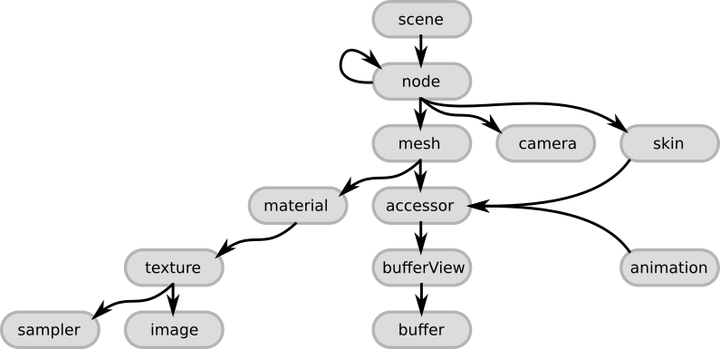
scene
scene是解析一个glTF的入口,一个glTF可以包含多个scene
一个scene中会有一个nodes,nodes是一个数组,指向多个node
一个node中会有mesh等元素
mesh
一个meshes包含多个primitives(图元),每个图元中有一个attributes(属性)和indices
attributes中包含着模型的顶点数据(vertices),比如POSITION、NORMAL、TEXCOORD_0
“meshes” : [ { “primitives” : [ { “attributes” : { “POSITION” : 1 }, “indices” : 0 } ] } ],
accessor
accessor(访问器),这是对资源的一种抽象封装,它存储了bufferView的结构,以及访问方法
对于mesh、skin、animation等数据,我们要通过accessor来访问。accessor中有一个bufferView,bufferView又指向存储真正二进制数据的buffer
“accessors” : [ { “bufferView” : 0, “byteOffset” : 0, “componentType” : 5123, “count” : 3, “type” : “SCALAR”, “max” : [ 2 ], “min” : [ 0 ] }, { “bufferView” : 1, “byteOffset” : 0, “componentType” : 5126, “count” : 3, “type” : “VEC3”, “max” : [ 1.0, 1.0, 0.0 ], “min” : [ 0.0, 0.0, 0.0 ] } ],
buffer
A buffer defines a block of raw, unstructured data with no inherent meaning
为了便于渲染API的使用,glTF里的buffer是单纯的二进制,因此在解析时一定要明确读取的步长、类型
bufferView
A bufferView describes a “chunk” or a “slice” of the whole, raw buffer data
bufferView将一个完整的巨大的二进制内容切割为一个个小片,可以实现一个buffer存储多种类型的数据,还可以实现字节对齐等功能
一个简单的读mesh示例
举一个简单的glTF读取mesh的例子,仅读取index buffer和vertex buffer(只有POSITION和TEXCOORD_0)
class GltfLoader { public: GltfLoader(std::string model_path); ~GltfLoader(); std::vector<Index> loaded_index_buffer; std::vector<Vertex> loaded_vertex_buffer; private: tinygltf::Model m_gltf_model; tinygltf::TinyGLTF m_loader_context; };
GltfLoader::GltfLoader(std::string model_path) { std::string gltf_load_error; std::string gltf_load_warning; bool gltf_load_result = m_loader_context.LoadASCIIFromFile(&m_gltf_model, &gltf_load_error, &gltf_load_warning, model_path); if (gltf_load_result) { // load mesh for (auto& mesh : m_gltf_model.meshes) { for (auto& primitive : mesh.primitives) { // vertex int vertex_count = 0; std::vector<Vertex> local_vertex_buffer; // position if (primitive.attributes.find(“POSITION”) != primitive.attributes.end()) { const int accessor_index = primitive.attributes.at(“POSITION”); const tinygltf::Accessor& accessor = m_gltf_model.accessors[accessor_index]; const tinygltf::BufferView& buffer_view = m_gltf_model.bufferViews[accessor.bufferView]; const tinygltf::Buffer& buffer = m_gltf_model.buffers[buffer_view.buffer]; const float* data_ptr = reinterpret_cast<const float*>(&buffer.data[buffer_view.byteOffset + accessor.byteOffset]); const int position_byte_stride = 3; vertex_count = accessor.count; for (int i = 0; i < vertex_count; i++) { Vertex local_vertex; local_vertex.pos = glm::vec3(data_ptr[i * position_byte_stride], data_ptr[i * position_byte_stride + 1], data_ptr[i * position_byte_stride + 2]); local_vertex_buffer.push_back(local_vertex); } } // uv if (primitive.attributes.find(“TEXCOORD_0”) != primitive.attributes.end()) { const int accessor_index = primitive.attributes.at(“TEXCOORD_0”); const tinygltf::Accessor& accessor = m_gltf_model.accessors[accessor_index]; const tinygltf::BufferView& buffer_view = m_gltf_model.bufferViews[accessor.bufferView]; const tinygltf::Buffer& buffer = m_gltf_model.buffers[buffer_view.buffer]; const float* data_ptr = reinterpret_cast<const float*>(&buffer.data[buffer_view.byteOffset + accessor.byteOffset]); const int uv_byte_stride = accessor.ByteStride(buffer_view) ? (accessor.ByteStride(buffer_view) / sizeof(float)) : tinygltf::GetNumComponentsInType(TINYGLTF_TYPE_VEC2); for (int i = 0; i < vertex_count; i++) { local_vertex_buffer[i].texture_coord = glm::vec2(data_ptr[i * uv_byte_stride], data_ptr[i * uv_byte_stride + 1]); } } // append local vertex buffer to loaded vertex buffer for (int i = 0; i < vertex_count; i++) { loaded_vertex_buffer.push_back(local_vertex_buffer[i]); } // index if (primitive.indices >= 0) { const tinygltf::Accessor& accessor = m_gltf_model.accessors[primitive.indices]; const tinygltf::BufferView& buffer_view = m_gltf_model.bufferViews[accessor.bufferView]; const tinygltf::Buffer& buffer = m_gltf_model.buffers[buffer_view.buffer]; const void* dataPtr = &(buffer.data[buffer_view.byteOffset + accessor.byteOffset]); const int elements_count = accessor.count; // MARK: the component type is very important, common is TINYGLTF_PARAMETER_TYPE_UNSIGNED_SHORT switch (accessor.componentType) { case TINYGLTF_PARAMETER_TYPE_UNSIGNED_INT: { const uint32_t* buf = static_cast<const uint32_t*>(dataPtr); for (int i = 0; i < elements_count; i++) { Index local_index; local_index.index = buf[i]; loaded_index_buffer.push_back(local_index); } break; } case TINYGLTF_PARAMETER_TYPE_UNSIGNED_SHORT: { const uint16_t* buf = static_cast<const uint16_t*>(dataPtr); for (int i = 0; i < elements_count; i++) { Index local_index; local_index.index = buf[i]; loaded_index_buffer.push_back(local_index); } break; } case TINYGLTF_PARAMETER_TYPE_UNSIGNED_BYTE: { const uint8_t* buf = static_cast<const uint8_t*>(dataPtr); for (int i = 0; i < elements_count; i++) { Index local_index; local_index.index = buf[i]; loaded_index_buffer.push_back(local_index); } break; } default: std::cerr << “Index component type ” << accessor.componentType << ” not supported!” << std::endl; return; } } } } // TODO: load children // TODO: load transform, material, texture, skin, skeleton, animtion, blendshape } }
1. 本站所有资源来源于用户上传和网络,如有侵权请邮件联系站长!
2. 分享目的仅供大家学习和交流,请不要用于商业用途!
3. 如果你也有好源码或者教程,可以到用户中心发布,分享有积分奖励和额外收入!
4. 本站提供的源码、模板、插件等等其他资源,都不包含技术服务请大家谅解!
5. 如有链接无法下载、失效或广告,请联系管理员处理!
6. 本站资源售价只是赞助,收取费用仅维持本站的日常运营所需!
7. 如遇到加密压缩包,默认解压密码为"gltf",如遇到无法解压的请联系管理员!
8. 因为资源和程序源码均为可复制品,所以不支持任何理由的退款兑现,请斟酌后支付下载
声明:如果标题没有注明"已测试"或者"测试可用"等字样的资源源码均未经过站长测试.特别注意没有标注的源码不保证任何可用性
GLB下载网 - GLB/GLTF模型与格式资源免费下载,支持在线浏览与转换 » glTF/GLB格式入门
2. 分享目的仅供大家学习和交流,请不要用于商业用途!
3. 如果你也有好源码或者教程,可以到用户中心发布,分享有积分奖励和额外收入!
4. 本站提供的源码、模板、插件等等其他资源,都不包含技术服务请大家谅解!
5. 如有链接无法下载、失效或广告,请联系管理员处理!
6. 本站资源售价只是赞助,收取费用仅维持本站的日常运营所需!
7. 如遇到加密压缩包,默认解压密码为"gltf",如遇到无法解压的请联系管理员!
8. 因为资源和程序源码均为可复制品,所以不支持任何理由的退款兑现,请斟酌后支付下载
声明:如果标题没有注明"已测试"或者"测试可用"等字样的资源源码均未经过站长测试.特别注意没有标注的源码不保证任何可用性
GLB下载网 - GLB/GLTF模型与格式资源免费下载,支持在线浏览与转换 » glTF/GLB格式入门
常见问题FAQ
- 免费下载或者VIP会员专享资源能否直接商用?
- 本站所有资源版权均属于原作者所有,这里所提供资源均只能用于参考学习用,请勿直接商用。若由于商用引起版权纠纷,一切责任均由使用者承担。更多说明请参考 VIP介绍。
- 提示下载要提取码
- 分享过期和重复下载怎么办
- 模型和平台不兼容怎么办